
Why Disparate Tools Undermine Roofing Roll-Up Efficiency
Discover why disparate tools undermine roofing roll-up efficiency and learn how to streamline workflows for improved productivity and growth.

Disparate tools are the single largest operational liability in a roofing roll-up, fracturing workflows across measurement, estimating, scheduling, and accounting into isolated data pools that no one fully owns. When your team runs one tool for measurements, another for job status, another for financials, and another for photos, you have not built a tech stack. You have built four separate businesses that happen to share a name. The result is duplicate data entry, missed handoffs, and a leadership team spending its leverage on manual coordination instead of growth. Understanding why disparate tools undermine roofing roll-up efficiency is the first step toward fixing it.
Why Disparate Tools Undermine Roofing Roll-Up Efficiency
Fragmented tool stacks create information silos that force every team member to carry the integration burden manually. Measurements live in one system, job status in another, financials in a third. No single screen tells you where a job stands, what it has cost so far, or whether the crew showed up on time. That missing visibility is not a minor inconvenience. It is the root cause of budget overruns, delayed invoices, and customer complaints that erode the reputation of an otherwise well-run operation.
The operational cost is quantifiable. Context switching between tools consumes 20 to 40 percent of productive time, with roofing office teams routinely jumping between five or more apps fifty times a day. That figure means a five-person office is effectively losing the equivalent of one to two full-time employees to app-switching alone. The productivity loss compounds at every level of the organization, from project managers to executives reviewing weekly reports.
The workaround most teams reach for makes things worse. Spreadsheet bridges become the de facto integration layer between disconnected systems, creating data drift and version conflicts that erode reporting accuracy over time. A spreadsheet tracking cross-tool job data is not a solution. It is a fragile promise that breaks the moment one person forgets to update a row.
“The root problem is the gap between tools, which requires manual glue rather than a single best-in-class tool.” — Complete Guide to Roofing Software Integrations 2026
Key symptoms of tool fragmentation in roofing roll-ups include:
- Duplicate data entry across CRM, proposal, and accounting systems, multiplying error risk with every re-key
- No single job timeline visible to both field crews and office teams simultaneously
- Reporting gaps caused by financials, labor hours, and change orders living in separate systems
- Delayed invoicing because billing triggers depend on field data that never arrives automatically
How Integration Gaps Cause Missed Handoffs and Stalled Jobs
The most expensive failure mode in a fragmented stack is not the duplicate entry. It is the job that sits in limbo because no one owns the gap between two systems. An estimate gets completed in one tool, but the follow-up scheduling lives in another. Without clear ownership at each handoff boundary, leads stall, material orders get delayed, and jobs that should start in two weeks drift to six.
This pattern repeats across every stage of a commercial roofing project. The handoff from sales to operations, from operations to field, and from field to billing each represents a gap where data must travel manually between systems. When that travel depends on a person remembering to copy information from one app to another, the workflow is only as reliable as that person’s attention on their busiest day.
Defining integration ownership is the structural fix most roll-ups skip. The question is not just “do these tools sync?” but “who is responsible when the sync fails or when no sync exists?” Without that answer, even partially integrated stacks behave like gaps, causing jobs to stall even when data technically exists somewhere in the ecosystem.
Here is a practical sequence for auditing handoff ownership in your current stack:
- Map every workflow stage from lead capture through final invoice.
- Identify which tool owns each stage and who is responsible for the transition.
- Flag every stage where the transition requires a human to manually move data.
- Assign an explicit owner to each flagged gap, not a team, a named individual.
- Measure how often each gap causes a delay of more than 24 hours.
Pro Tip: Before evaluating any new software, complete this handoff audit first. You will find that most of your efficiency losses are not tool problems. They are ownership problems that a new tool will not solve unless you redesign the workflow around it.
Comparing Integration Methods and Their Impact on Roll-Up Performance
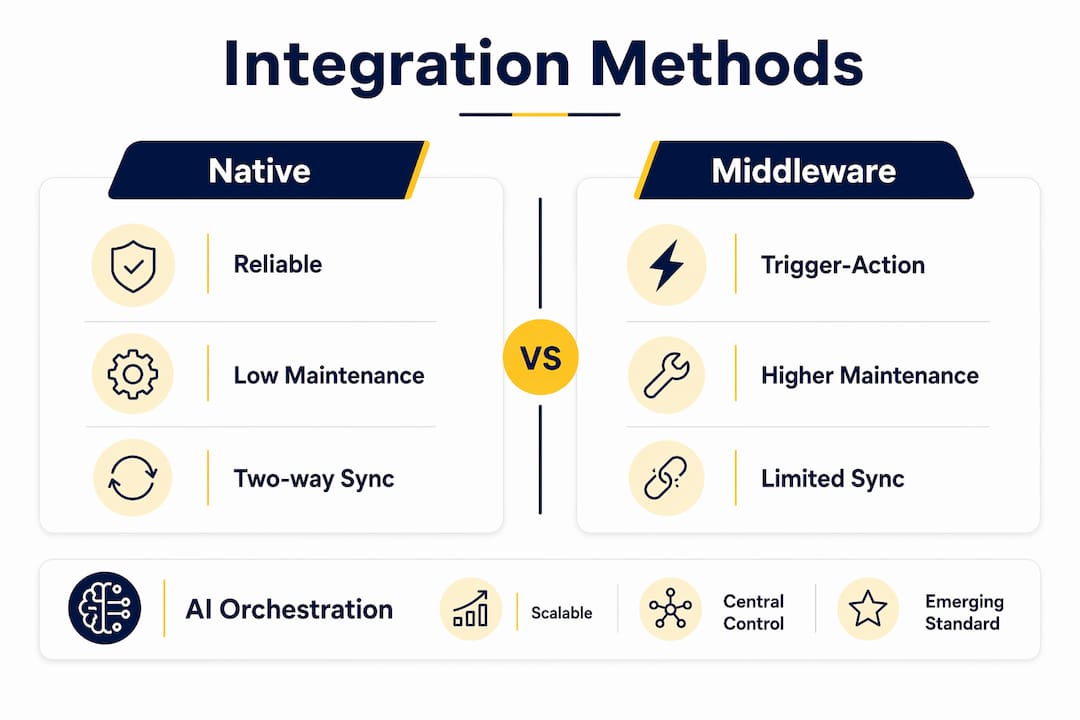
Not all integrations are equal, and the method you choose determines how much operational risk you carry. The table below compares the three most common approaches roofing roll-ups use today.
Native integrations between tools like an invoicing software and your proposal software are the most reliable option when they exist. They support two-way syncs and require minimal ongoing maintenance. The problem is that native integrations cover only the connections the vendors chose to build, which rarely matches the full workflow a growing roll-up actually runs.
Middleware tools handle simple trigger-action workflows well. When a job status changes in one system, Zapier can push a notification or update a field in another. However, these tools break down at scale. Complex multi-step workflows with conditional logic, error handling, and real-time data requirements exceed what middleware was designed to manage. A roll-up managing 50 or more active jobs simultaneously will find Zapier-based stacks generating more maintenance tickets than they solve.
AI orchestration layers represent the emerging standard for operations at scale. They sit above the individual tools and coordinate data flow, task routing, and workflow triggers across the entire stack. The tradeoff is configuration complexity upfront, but the long-term maintenance burden is significantly lower than maintaining dozens of individual point-to-point integrations.
Pro Tip: Audit your current integrations by counting how many require a human to verify the sync worked. Every manual verification step is a hidden labor cost and a signal that the integration is not production-grade.
How Tool Sprawl Degrades Roofing Roll-Up Performance Over Time
The challenge in roofing operations is not just that individual tools fail to connect. It is that the total number of tools in the stack actively degrades the performance of the entire system. Roofing contractors use 6 to 8 different software applications on average, according to a 2024 NRCA market survey, creating duplicate records and data fragmentation across the organization. That number is not a sign of sophistication. It is a warning sign.
Microsoft Research identified a phenomenon called tool-space interference, where system performance degrades as tool counts grow due to name collisions, semantic overlaps, and response latency. Applied to roofing operations, the principle holds: the more tools your team must navigate, the more cognitive load they carry, and the more likely they are to make errors or skip steps entirely.
The accuracy implications are severe. Research on AI agent tool selection shows a non-linear accuracy drop from approximately 95 percent to below 30 percent as tool counts grow without governance. The same degradation pattern applies to human operators managing large, unstructured tool catalogs. More tools do not produce more capability. They produce more confusion.
“Integration quality and governance matter more than vendor procurement as tool ecosystems grow.” — Microsoft Research
The practical implications for a roofing roll-up managing 6 or more software applications are direct:
- Tool discoverability drops as the catalog grows, meaning team members default to workarounds rather than using the right tool
- Training costs compound with every new application added to the stack
- Shadow silos form when departments adopt tools independently, repeating the CRM failure pattern that most roll-ups have already experienced once
Practical Strategies to Unify Tools and Reclaim Operational Leverage
The path forward is not finding the perfect all-in-one platform. It is designing a connected ecosystem with explicit integration ownership at every handoff point. The benefits of unified tools compound over time, but only when the architecture is intentional from the start.
Follow this sequence to move from fragmented to connected:
- Freeze tool additions. No new software enters the stack without a documented integration plan and a named owner for the handoff it creates or affects.
- Audit by workflow stage. Separate your pre-sale, execution, and post-sale workflows. Identify which tools serve each stage and where the data gaps exist between them.
- Prioritize native integrations first. Where vendor-supported connections exist between your current tools, activate and test them before building middleware workarounds.
- Replace spreadsheet bridges. Every spreadsheet being used to reconcile data between two systems is a liability. Replace it with a direct integration or eliminate the redundant tool.
- Establish a quarterly governance review. Review the full tool catalog every 90 days. Remove tools that duplicate function, and measure each remaining tool against volume, conversion, and time metrics.
- Assign an integration owner. This is a role, not a committee. One person is accountable for the health of the data flow between systems.
Disconnected tool stacks shift leadership into manual coordination, eroding the operational leverage that makes a roll-up worth building. The goal is a stack where data moves automatically from field capture through invoicing, and where your executives spend their time on decisions, not on chasing down job status updates across five different apps.
Pro Tip: The most scalable roofing operations treat integration design as a core competency, not an IT task. Assign it to an operations leader who understands both the workflow and the tools.
How Terial Eliminates Fragmentation for Commercial Roofing Roll-Ups
Terial is built specifically to solve the fragmentation problem that disconnected tools create in commercial roofing operations. Rather than adding another point solution to your stack, Terial acts as the unified operating system that connects estimating, field service, scheduling, and invoicing into a single real-time workflow. Job data captured in the field flows automatically through to billing, eliminating the manual re-entry that costs your team hours every week. Crew dispatch, change orders, labor tracking, and invoice generation all operate from one connected system, so your office team stops chasing data and starts managing outcomes. If your roll-up is running 6 or more disconnected applications today, explore Terial’s full feature set to see what a purpose-built integration layer looks like for commercial roofing at scale.
Key Takeaways
Fragmented tools in roofing roll-ups do not just create inconvenience. They create a structural efficiency deficit that compounds with every job, every hire, and every acquisition.
FAQ
Why do disparate tools hurt roofing roll-up efficiency?
Disparate tools force manual data re-entry across systems, create information silos, and eliminate clear ownership at workflow handoff points. The result is lost productive time, delayed invoicing, and jobs that stall between systems with no automatic trigger to move them forward.
How many tools does the average roofing contractor use?
Roofing contractors use 6 to 8 different software applications on average, according to a 2024 NRCA market survey. That volume creates duplicate records, training overhead, and data fragmentation that grows more expensive as the business scales.
What is the difference between native integrations and middleware tools?
Native integrations are vendor-built, support two-way data sync, and require minimal maintenance. Middleware tools like Zapier handle simple trigger-action workflows but break down under the complexity and volume of a multi-job commercial roofing operation.
What causes jobs to stall in a fragmented tool stack?
Jobs stall when no one owns the gap between two systems. An estimate completed in one tool requires a human to manually trigger follow-up in another, and when that step is missed, the job sits in limbo with no automated recovery path.
How does Terial address tool fragmentation for roofing roll-ups?
Terial replaces the fragmented stack with a single connected system covering estimating, field service, scheduling, and invoicing. Data moves automatically from field capture through billing, eliminating the manual coordination that consumes executive time and degrades operational performance.
Recommended
- How Manual Processes Limit Roofing Scalability
- Why Residential-First Roofing Software Fails on Commercial Jobs
- Why Low-Slope Roofing Needs Dedicated Service Software
- Terial | Workflow Automation for Commercial Roofers





Book a personalized demo
Get a 30-minute demo tailored to how you run your commercial roofing business

“Making the switch to Terial has greatly exceeded my expectations and has already had a meaningful impact on our team’s productivity. Terial has significantly reduced the amount of time required to complete many of our day-to-day operational tasks, allowing our team to focus more on serving our customers.”

