
Job Management System for Commercial Roofers: 2026 Guide
Discover a comprehensive job management system for commercial roofers. Streamline your projects and boost efficiency with our 2026 Guide.

A job management system is software that controls the full lifecycle of a roofing job, from first contact and scheduling through field execution, job costing, and final invoicing. For commercial roofing contractors, that definition carries real weight. Running jobs across disconnected tools, spreadsheets, and group texts costs you money every single day. A purpose-built job management platform replaces fragmented software stacks with one connected data model, giving your office and field crews a single source of truth. Terial was built specifically for this problem.
What Key Features Must a Job Management System Have?
The right system covers every stage of a commercial roofing job without forcing your team to jump between apps. Comprehensive systems replace standalone CRM, accounting, and scheduling tools with one integrated workflow. That integration is not a convenience. It is the difference between catching a budget overrun on day three versus discovering it after the job closes.
Here are the features that matter most for commercial roofing operations:
- Scheduling and multi-crew dispatch. Assign crews to jobs visually, see conflicts instantly, and push updates to the field without a phone call.
- Mobile work orders with offline access. Crews on a roof do not always have signal. The system must capture photos, notes, and labor hours offline and sync when connectivity returns.
- Job costing and profitability tracking. Real-time cost data tied to each job, not a spreadsheet you reconcile at month end.
- Customer and site records. Full history per property, including past work, warranties, and contact details, accessible from the field.
- Photo and document uploads on-site. Before and after photos attached directly to the job record, not buried in someone’s camera roll.
- Integrated quoting and invoicing. Generate a quote, win the job, and convert it to an invoice without re-entering data.
- Real-time dashboard visibility. A single view showing every active job, crew status, and open task across your entire operation.
Pro Tip: Set a rule that no job can be marked complete without at least one photo attached. This single requirement dramatically improves documentation quality and protects you in disputes.
The goal is zero manual double entry. Every field update should flow directly into scheduling, billing, and reporting without anyone retyping it.
How Does Specialized Software Differ from Generic Project Management Tools?
Generic task management software tracks tasks. A field-focused job management system executes work. That distinction sounds subtle, but it defines whether your crews actually use the tool or abandon it by week two.
General-purpose project management tools lack industry-specific features like technician dispatch, material tracking, and field-to-office sync. Those gaps are not minor. They force crews to revert to paper or phone calls, which defeats the purpose of the software entirely.
The table below shows where the two categories diverge on the capabilities that matter most to commercial roofing operations.
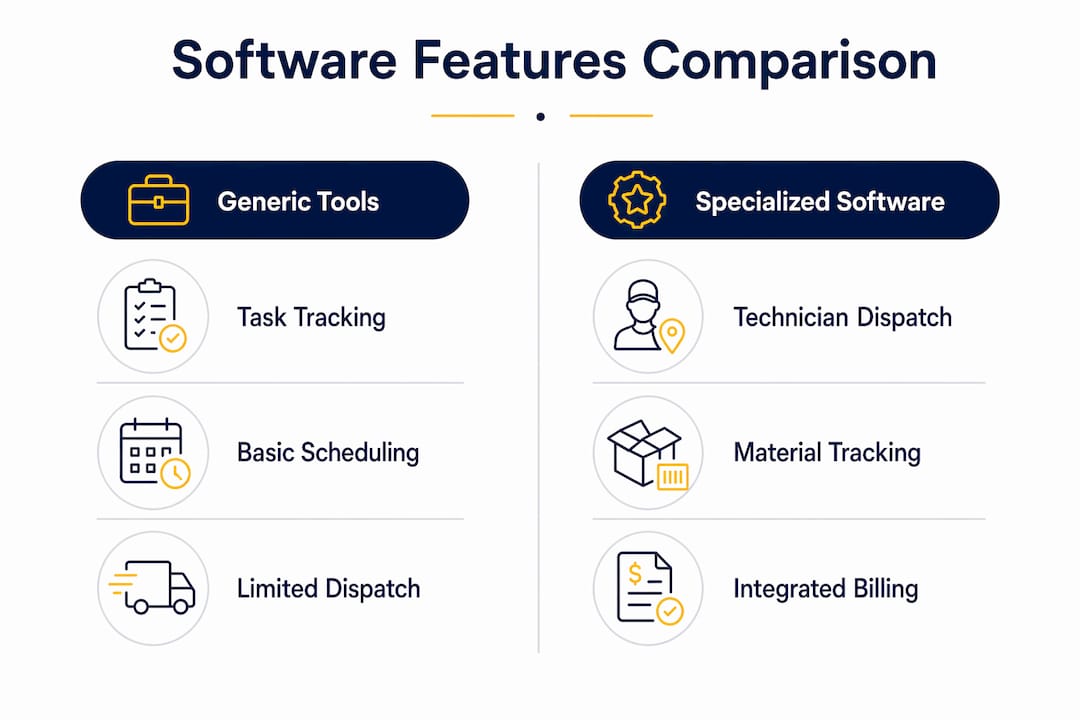
High-volume dispatch requires a dashboard built for scale. A commercial roofing contractor running 30 active jobs across five crews needs color-coded status views, not a flat task list. Generic tools simply were not designed for that operational reality.
The deeper issue is data. Separated software leads to budget overruns that are only discovered too late. When your field data, job costs, and accounting live in different systems, you have profitability blind spots by design. A unified data model closes those gaps automatically.
Hiring or evaluating the right people to manage these systems also matters. Understanding what project manager skills contractors need helps you build a team that gets full value from the platform you choose.
What Are the Best Practices for Adopting a Job Management System?
Adoption is where most implementations fail. The software can be excellent, but if your crews do not use it consistently, you get none of the benefits.
- Start with a realistic onboarding timeline. Modern platforms with self-service setup and video walkthroughs get teams fully operational in 5–10 days. That is a far cry from the months-long enterprise rollouts of a decade ago. Set that expectation with your team upfront.
- Choose a mobile interface your crews will actually use. Mobile-friendly, visual interfaces with simple photo uploads and minimal required inputs dramatically improve crew compliance on the roof. If the app takes 12 taps to log a labor hour, it will not get used.
- Require real-time field updates from day one. Field updates must sync instantly to office scheduling and billing. Make this a non-negotiable part of how jobs are run, not an optional feature.
- Eliminate your fragmented stack before you add the new system. Running the new platform alongside old spreadsheets and separate apps creates confusion. Pick a go-live date and cut over completely.
- Tie financial outcomes to adoption. Show your team how unified job data shortens invoice-to-payment cycles. When crews see that their field photos directly trigger invoicing, the behavior becomes self-reinforcing.
- Train foremen first. Foremen set the standard on the job site. If they log photos and close work orders correctly, the rest of the crew follows.
Pro Tip: Run a two-week pilot on one crew before rolling out company-wide. Fix the friction points on a small scale before they become company-wide habits.
The technology adoption tips that work for roofing crews consistently point to one factor: simplicity at the point of use. The fewer steps required on the roof, the higher the compliance rate.
How Can Real-Time Dispatching and Mobile Work Orders Boost Efficiency?
Real-time dispatching is the operational core of any field service operation. For commercial roofing, where crews move between large sites and job conditions change daily, the ability to reassign work instantly is not a luxury.
Live technician location maps let you assign the closest available crew to an urgent job, cutting unassigned job delays without a single phone call. Color-coded dashboards show assigned versus unassigned jobs at a glance, so your dispatcher is never guessing about crew availability.
Mobile work orders extend that efficiency to the field. Here is what changes when crews complete work orders on-site rather than calling in updates:
- Morning briefings get shorter. Job instructions, site notes, and safety requirements live in the app. Crews read them before they climb the ladder.
- Accountability improves automatically. Requiring photos, digital signatures, and completion notes before a job can be closed creates a documented record without extra paperwork.
- Office calls drop significantly. When the field has the information it needs and can push updates directly, the back-and-forth between site and office shrinks fast.
- Invoice cycles accelerate. Completed job evidence, including photos and signatures, links directly to invoicing. Businesses that connect field evidence to billing report measurable improvements in cash flow.
The real-time dispatching impact on low-slope commercial roofing is particularly significant. These jobs often involve multiple crews on the same site over multiple days. Without live dispatch visibility, scheduling conflicts and idle crew time are almost inevitable.
Automating crew dispatch removes the manual coordination burden from your service manager and puts the right crew on the right job faster. That speed compounds across every job you run.
Key Takeaways
A job management system built for commercial roofing replaces fragmented tools with one connected workflow, giving contractors real-time visibility from dispatch through invoicing.
Terial Brings It All Together for Commercial Roofers
Fragmented tools are the real competition. When your estimating, scheduling, dispatch, field documentation, and invoicing each live in a different system, you lose time and margin on every single job. Terial is the unified operating system built specifically for commercial roofing contractors. It connects every workflow from the first site visit through final payment into one real-time platform your crews will actually use. The Terial platform handles AI-driven dispatch, mobile work orders, change order management, and invoice generation in under a minute. Explore the full feature set to see how it fits your operation.
FAQ
What Is a Job Management System?
A job management system is software that manages the full lifecycle of a job, from scheduling and dispatch through field execution, job costing, and invoicing. For commercial roofing contractors, it replaces disconnected tools with one connected platform.
How Is It Different from Task Management Software?
Task management software tracks to-do items. A job management system executes field work, including technician dispatch, mobile work orders, material tracking, and real-time cost monitoring, none of which generic task tools provide.
How Long Does It Take to Implement?
Modern platforms with self-service onboarding get teams fully operational in 5–10 days. That timeline applies to small and mid-sized commercial roofing contractors using current cloud-based systems.
What Does Job Management Software Cost?
Pricing for dedicated job management platforms starts around $45 per month for small teams, with costs scaling based on user count and feature depth. Enterprise-level platforms built for commercial roofing are priced separately and not always publicly listed.
Why Do Field Crews Abandon Generic Apps?
Generic apps lack offline mobile access and require too many steps to log field data. When crews cannot complete a work order quickly on the roof, they revert to paper or phone calls, which breaks the data chain between field and office.
Recommended




Book a personalized demo
Get a 30-minute demo tailored to how you run your commercial roofing business

“Making the switch to Terial has greatly exceeded my expectations and has already had a meaningful impact on our team’s productivity. Terial has significantly reduced the amount of time required to complete many of our day-to-day operational tasks, allowing our team to focus more on serving our customers.”

