
How to Track Labor Hours for Maximum Project Profit
Learn to track labor hours in construction projects effectively. Boost your profit and avoid costly mistakes with this essential guide.

If you’re running a commercial roofing operation above $5M in revenue, you already know that labor is your most volatile cost line. A single project where crews log hours loosely, foremen batch-enter time at the end of the week, or cost codes get misassigned can quietly erase a margin you spent months estimating. Poor productivity causes up to 35% project losses, and yet most contractors still rely on fragmented tools that were never designed to work together. This guide cuts straight to what works: the right process, the right structure, and the mindset shift that turns raw hour data into real profit protection.
Key Takeaways
- Labor tracking drives profits. Accurate, daily tracking of field hours is critical for protecting project margins and reducing errors.
- Daily entry beats weekly batching. Foreman entry at the end of every shift produces far better data than memory-based weekly logs.
- Cost code structure matters most. Hours mapped to the right phase on the day they happen are what make estimating data trustworthy.
- Real-time review enables action. Weekly PM variance reviews surface overruns while you can still act on them, not after closeout.
- Crew buy-in is non-negotiable. Long-term success comes from clear policies, leadership reinforcement, and involving foremen in the rollout.
Why Accurate Labor Tracking Matters
Labor is not a minor line item. For most commercial roofing contractors, labor runs roughly 18% of project revenue, and that number swells fast when overtime kicks in, crews move between phases, or change orders go untracked. A 5% labor overrun on a $2M project is $36,000 gone before you even notice it.
The three consequences that hit hardest are lost profit from untracked hours, inaccurate billing that leaves money on the table, and compliance exposure when records don’t hold up to an audit. None of these are abstract risks. They show up on every project where tracking is inconsistent.
The ROI case for getting this right is straightforward. Contractors who move from paper or spreadsheet-based tracking to integrated digital systems consistently report sharp reductions in payroll errors and admin time. That’s not a marginal improvement. That’s the difference between a profitable quarter and a breakeven one.
Here are the highest-impact risks for contractors at the $5M+ level who lack a robust tracking system:
- Undetected labor overruns that don't surface until the project is already over budget
- Billing disputes caused by incomplete or inaccurate time records tied to specific phases
- Compliance failures during wage audits or certified payroll reviews
- Estimating drift where future bids are built on flawed historical labor data
- Inflated payroll from approximate or memory-based time entries
The roofing automation features that address these risks aren’t optional upgrades. At scale, they’re the floor.
The Right Setup for Commercial Roofing Labor Tracking
Before you can run an effective tracking process, you need the right infrastructure in place. The most effective systems combine mobile time entry, real-time job and cost code assignment, and direct connections to payroll and accounting. For multi-crew, multi-site roofing operations, an integrated platform with job-level cost coding can cut admin time significantly compared to disconnected spreadsheets and timesheets.
Here’s a quick-reference breakdown of the core components you need:
- Mobile time entry. Field crews log hours on the job, not from memory at the end of the week. This alone eliminates the largest single source of error in commercial roofing labor data.
- Cost code structure. Phase-level cost codes that match your estimate structure. Every hour gets assigned to a specific scope, so labor data ties directly to job costing.
- Payroll integration. Approved time flows automatically to payroll, eliminating manual re-entry and the errors that come with it.
- Foreman approval workflow. A clear sign-off step before time hits payroll, so verification happens daily rather than retroactively.
- Phase tracking for delays. A way to log weather delays, standby time, and non-productive hours so they don't get rolled into productive labor and distort your estimating data.
The field service app solutions that work best for commercial roofing are built to handle the offline reality of job sites, not just the clean version of the workflow that looks good in a demo.
For setup, these are the non-negotiable requirements before you go live:
- Issue mobile devices or confirm a BYOD policy with all field staff
- Configure cost codes that match your estimate structure before the first clock-in
- Set up manager approval workflows so foremen verify before PMs review
- Run a live training session with every crew, including 1099 subs
- Test payroll export with a small batch before full rollout
Pro Tip: Don’t skip onboarding your 1099 crews. They’re often the ones working the most complex phases, and if they’re logging hours on paper while your W-2 employees use the app, your cost code data will be split and unreliable. Treat them like employees during setup.
The cost code structure you configure upfront determine the quality of every report you’ll pull for the rest of the project. Get that structure right before day one.
Step-by-Step Process to Track Labor Hours Efficiently
A clean process beats a complicated tool every time. Here’s the sequence that works for commercial roofing projects with multiple crews, phases, and trade types:
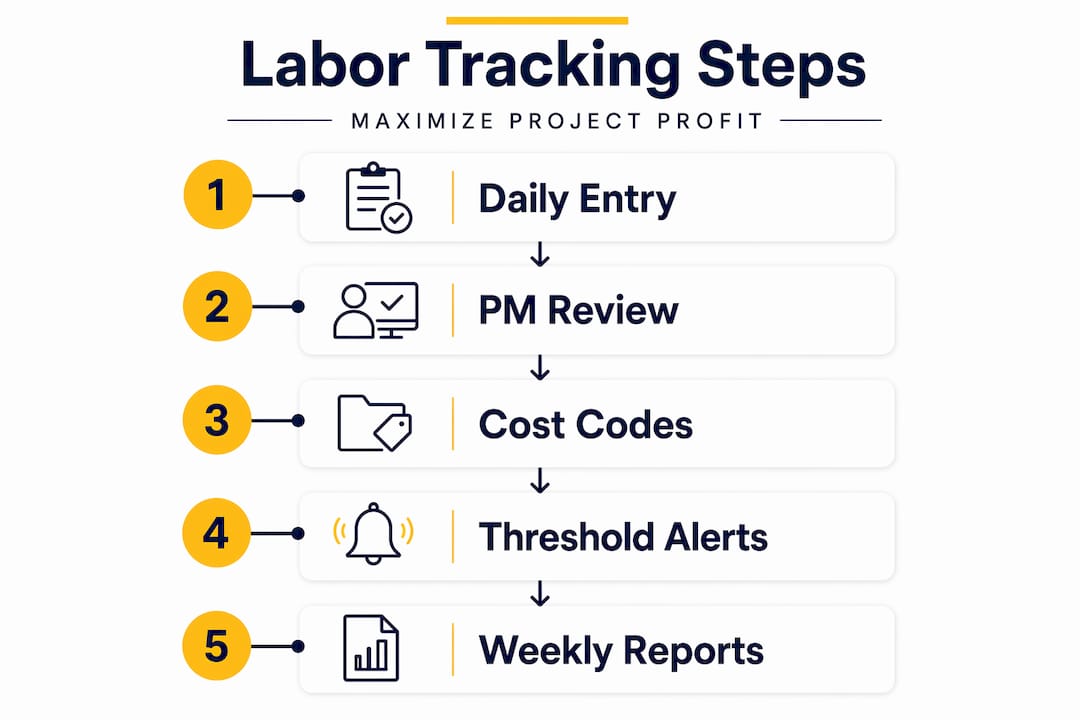
- Crew clocks in on the job site through the mobile app, tagged to the project and phase
- Cost code assigned at clock-in, not retroactively, so every hour maps to a specific scope
- Foreman reviews and approves crew time at the end of each shift, same day
- Project manager audits daily totals against the estimate, flagging any phase overruns
- Weekly payroll export runs automatically from approved time, no manual re-entry
- Labor efficiency report generated weekly: labor per square, phase variance, overtime by crew
The critical rule is daily entry. Daily foreman entry and PM review stops memory errors before they compound. Weekly batch entry is where accuracy goes to die. A foreman trying to reconstruct four days of crew movements on a Friday afternoon will get it wrong, and those errors stack up across a project.
Here’s how the three main tracking approaches compare:
Paper timesheets produce low accuracy, eat significant admin time, and don’t scale beyond one or two concurrent projects. Reconstruction at the end of the week is the norm, not the exception.
Basic mobile time clocks are an improvement on paper but typically lack the cost code depth needed for real job costing. You get hours, but not the phase-level detail that protects margins.
Integrated systems with cost coding produce high accuracy, minimal admin time, and the kind of phase-level data that makes both project management and estimating sharper over time. This is the level you need above $5M in revenue.
To track labor hours at the level of detail that actually protects margins, you need the third. The first two work until you’re managing three or more concurrent projects, and then they fall apart.
Pro Tip: Build a weekly variance review into the PM’s calendar — same day, same time, every week. If labor per square is running over the estimate on any phase, that’s a conversation you can still have while the job is in flight. Catching it during execution is worth far more than catching it at closeout.
For subcrews and 1099 staff, require the same clock-in process as your W-2 employees. Assign them to the same cost codes. If they’re doing different work (say, sheet metal versus membrane), give them distinct codes so you can see the labor split clearly. Complex roof phases like tapered insulation or penetration details tend to run over budget most often. Tracking them separately is how you catch that pattern early and adjust your future estimates.
The workforce management features that support multi-trade, multi-phase tracking are what separate a real operating system from a basic time clock.
Common Pitfalls and How to Avoid Them
Even contractors with solid tools in place run into the same recurring problems. Knowing them in advance is the fastest way to avoid them.
Switching from paper tracking is the right move, but it requires proper training and consistent reinforcing. Digital and mobile tracking reduces errors and fraud compared to paper, but only when crews are actually trained and the system is consistently used.
For smaller crews or early-stage operations, a simple daily log can be a reasonable starting point. But once you’re managing multiple sites and trade types, the complexity of paper-based systems creates hidden losses that compound over time.
The contractors who struggle most with adoption are the ones who launch the software without involving crew leads in the decision. When a foreman feels like the tool was chosen for them rather than with them, they find workarounds. Get your best foremen in the room during the evaluation phase.
Measuring Results: From Data to Profit
Tracking hours is only the first step. The real value comes from what you do with the data. The KPIs that matter most for commercial roofing operations are:
- Labor per square by phase and crew type
- Phase variance against the original estimate
- Burdened labor rate including overtime, benefits, and burden
- Overtime percentage by project and crew
- Crew productivity compared across similar job types
Weekly PM reviews of labor data are what turn tracking into profit. When a PM reviews phase variances every Monday morning, they can catch a crew that’s running 15% over on insulation before it bleeds into the membrane phase. That’s a conversation you can have. An end-of-project reconciliation is just a post-mortem.
The downstream benefit that most contractors undervalue is estimating accuracy. Every project you track at the phase and cost code level becomes a data point for your next bid. Over time, your labor estimates stop being educated guesses and start being grounded in your actual crew performance on comparable projects.
Here are the ROI signals that tell you your system is working:
- Payroll processing time drops noticeably
- Project managers catch overruns during execution, not after closeout
- The estimating team references historical labor data when building new bids
- Fewer billing disputes because time records are detailed and verifiable
- Compliance reviews pass without scrambling for documentation
Keep your records audit-ready at all times. Certified payroll requirements, prevailing wage jobs, and insurance audits all require clean, verifiable time records. A system that produces those automatically is not overhead. It’s protection.
What Most Roofing Leaders Get Wrong About Labor Tracking
The software is not the hard part. The hard part is the organizational change that has to happen around it.
Most contractors buy a tracking tool, set it up over a weekend, and expect adoption to follow. It doesn’t. Crews find workarounds. Foremen batch-enter time anyway. The data looks clean in the system but doesn’t reflect reality on the roof. Six months later, the tool gets blamed for not delivering ROI, and the cycle starts over with a different platform.
The real differentiator between contractors who get lasting value from labor tracking and those who don’t is visible leadership buy-in and frequent data reviews. When the owner or operations leader references labor per square in project meetings, crews understand that the data matters. When PMs are held accountable to weekly variance reviews, they actually do them.
A phased rollout with crew involvement consistently outperforms an overnight software launch. Start with one project, get your best foreman to champion it, and let the results speak before you push it across all active jobs. That approach builds credibility and surfaces the real friction points before they become company-wide problems.
The other mistake is treating labor tracking as a payroll function rather than a project management function. Payroll cares about hours and rates. Project management cares about hours, rates, phases, productivity, and variance. If your tracking data only flows to payroll, you’re leaving the most valuable part of it unused.
The contractors who use labor data well treat it as a live project signal, not a historical record. They look at variance during the job, not after it. That’s where the margin protection actually happens.
See What Terial Can Do For Your Labor Tracking
Terial is the single operating system for commercial roofing contractors. There’s no stitching together of separate tools, no manual exports, and no data living in three different places. The labor tracking features are designed for field adoption, which means your crews actually use them, and the data you get back is reliable. If you’re running $5M+ in revenue and still managing labor data across disconnected tools, Terial’s unified platform is the next step worth taking. Schedule a demo and see how it fits your operation.
Frequently Asked Questions
How often should foremen approve crew time?
Daily. End-of-shift approval prevents the memory errors and inaccuracies that come from batch-entering a full week of crew movements. It also gives project managers a real-time view of phase variances before they become budget problems.
Do I really need to track labor hours daily instead of weekly?
Yes. Daily entry is what makes the data trustworthy and actionable. Weekly batching produces hours that look complete on paper but rarely reflect what actually happened in the field.
How does labor tracking improve profit margins for roofing contractors?
Accurate tracking improves estimates, reduces underbidding, and helps project managers catch overruns during execution rather than after closeout. Over time, the historical data makes every future bid more precise.
How do I get 1099 subs to use the same tracking system as my W-2 crews?
Make it a contract requirement and onboard them the same way you onboard employees. If subs are logging hours separately, your cost code data has gaps that distort the labor split on every job they work.
Recommended




Book a personalized demo
Get a 30-minute demo tailored to how you run your commercial roofing business

“Making the switch to Terial has greatly exceeded my expectations and has already had a meaningful impact on our team’s productivity. Terial has significantly reduced the amount of time required to complete many of our day-to-day operational tasks, allowing our team to focus more on serving our customers.”

