
Automate Crew Dispatch for Commercial Roofing Teams
Learn how to automate crew dispatch for commercial roofing teams and boost efficiency. Save costs and streamline operations today!

When you run commercial roofing crews across multiple jobs, dispatch is where profit quietly disappears. Phone tag between the office and the field, crews sitting idle waiting for instructions, jobs running long because nobody caught the schedule conflict until it was too late. To automate crew dispatch in commercial roofing is not a luxury for large contractors. It is the difference between running a tight operation and watching margin bleed out on every project. This guide covers exactly what you need, how to set it up, and how to measure whether it’s working.
Key takeaways
- Automation cuts real costs: Automated scheduling reduces labor costs by 12-18% and saves up to 50,000 dollars annually in recovered admin time.
- Integrate before you automate: Connect dispatch tools with your CRM, accounting software, and job management system before going live to avoid data gaps.
- Real-time visibility is the real win: Automated dispatch exposes idle labor and scheduling gaps that manual methods hide completely.
- Buffer times prevent breakdowns: Build 48-hour schedule padding into your dispatch system to absorb weather delays and material shortages without cascading project disruptions.
- Measure what changed: Track idle hours, jobs completed per technician, and travel time before and after automation to validate your return.
Tools and prerequisites to automate crew dispatch
Before you configure a single automated workflow, you need the right foundation. Jumping into dispatch automation without preparing your data and systems is like putting GPS on a truck with no map. The technology works, but it will not take you anywhere useful.
What you need before you start:
- Accurate crew availability data updated in real time, including certifications, shift hours, and current job status
- Verified job details for every active project: address, scope, required crew size, estimated duration, and material status
- A central platform that connects scheduling, job management, and communication in one place
- Integration pathways to your accounting and CRM software so data flows without manual re-entry
The integration with CRM and accounting platforms eliminates manual data entry and saves 2 to 3 hours per lead handled, which adds up fast across a busy service season.
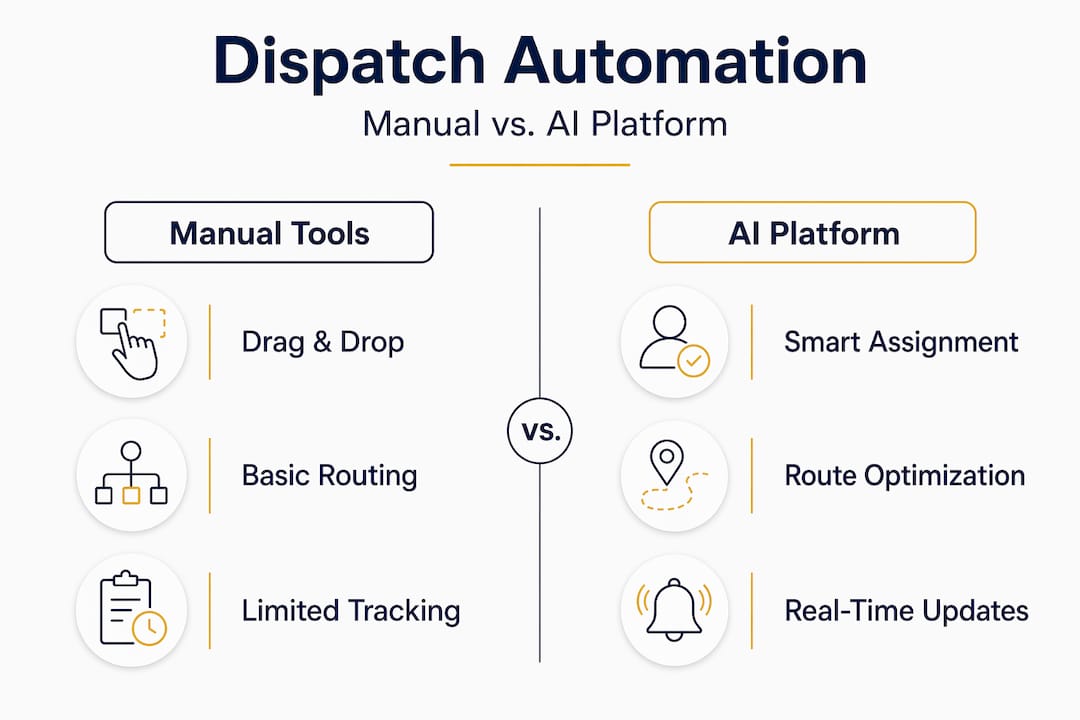
When comparing dispatch and crew scheduling software, the feature gap between platforms is significant. Here is a practical look at what separates capable tools from basic ones:
- Crew assignment
- Basic scheduling tools:
- Manual drag-and-drop scheduling
- AI-powered FSM platforms:
- Automatically assigns crews based on availability and location
- Basic scheduling tools:
- Route optimization
- Basic scheduling tools:
- No optimization or static routes only
- AI-powered FSM platforms:
- Real-time dynamic rerouting
- Basic scheduling tools:
- CRM/accounting sync
- Basic scheduling tools:
- Manual exports between systems
- AI-powered FSM platforms:
- Live API-based syncing across platforms
- Basic scheduling tools:
- Conflict detection
- Basic scheduling tools:
- Manual review required
- AI-powered FSM platforms:
- Automated alerts before conflicts happen
- Basic scheduling tools:
AI-powered FSM platforms that continuously optimize routes and assignments outperform rule-based systems by a wide margin, enabling 15 to 25% more completed jobs per technician each day.
Pro Tip: Before selecting a platform, audit your current dispatch process for one full week. Document every manual step, every phone call made to confirm crew location, and every scheduling fix made after the fact. That audit becomes your baseline and your business case.
How to implement automated dispatch workflows step by step
Once your tools and data are ready, implementation follows a logical sequence. Skipping steps here is where most contractors run into trouble, so treat this as a checklist, not a suggestion.
- Build your digital job board. Create a centralized job board that displays every active project with status, crew assignment, start time, and estimated completion. A well-structured job board with integrated calendar and task list reduces scheduling conflicts by up to 60% and cuts rework costs by 25%.
- Configure crew profiles. Enter each crew member’s role, certifications, shift availability, home location, and current workload. Automated assignment only works when the data behind it is accurate and current.
- Set assignment rules. Define the logic your system uses to match crews to jobs. Proximity to the job site, crew size requirements, skill match, and current job status should all factor into assignments. Most platforms allow you to weight these factors by priority.
- Activate route optimization. Enable real-time routing so the system recalculates travel paths as conditions change. A crew finishing early on one job can be rerouted to a nearby site rather than returning to the yard.
- Connect your back office. Integrate the dispatch platform with your accounting and CRM systems via API or pre-built connectors. Job completions, time logs, and material usage should flow automatically into billing and project records.
- Run a parallel test period. Before fully switching over, run your automated system alongside your manual process for two to three weeks. This surfaces configuration gaps without exposing active jobs to risk.
- Hand off to the team and train. Walk your dispatcher and field leads through the system with real jobs, not demos. The crew-facing app especially needs to feel simple and fast or adoption will stall.
Pro Tip: Set your automated system to flag any job where the crew has not checked in within 30 minutes of the scheduled start time. That single alert catches more problems before they compound than any manual follow-up process.
Common pitfalls when automating crew dispatch
Most automation failures are not technology failures. They are data and habit failures. Here is where commercial roofing teams consistently run into trouble, and how to avoid it.
Garbage in, garbage out. If your crew availability data is stale or your job details are incomplete, the automated system will make confidently wrong decisions. Assign one person ownership of data hygiene before go-live. This is not optional.
Ignoring buffer times. Weather and supply chain delays are a given in commercial roofing. Build 24 to 48 hours of material buffer and 48 hours of schedule padding into your dispatch configuration. Failing to do this turns a one-day delay into a cascading week-long disruption.
Over-trusting the algorithm. AI dispatch excels at repeatable bottlenecks like call sorting, routine assignments, and rerouting. It does not fully replace a dispatcher’s judgment when a client relationship is on the line or a complex multi-crew situation develops. Keep a human in the loop for anything outside the normal pattern.
Underinvesting in crew training. Your dispatcher adopting the new system matters. Your foremen and crew leads adopting the mobile app matters more. Field adoption is what determines whether the data coming back to your office is accurate and useful.
“The real value of dispatch automation is not speed. It is visibility. When you can see where every crew is and where every job stands in real time, you stop reacting to problems and start preventing them.” — Dispatch software vs manual scheduling
Managing disruptions well also means having a short list of backup crews or subcontractors you can plug into the system quickly. Build those contacts into your platform as a secondary crew pool so rescheduling does not require starting from scratch.
Measuring the impact of automated dispatch
You cannot manage what you cannot measure. Once your automated dispatch system is live, these are the numbers that tell you whether it is working.
Primary metrics to track:
- Jobs completed per technician per day (before and after)
- Idle hours per week across all crews
- Travel time as a percentage of total paid hours
- Crew no-show and late arrival rates
- Administrative hours spent on scheduling per week
Here is what a realistic before-and-after comparison looks like for a mid-size commercial roofing company running six to eight crews:
- Jobs completed per tech per day
- Before automation:
- 1.4 jobs/day
- After automation:
- 1.7–1.9 jobs/day
- Before automation:
- Weekly idle hours across crews
- Before automation:
- 18–24 idle hours/week
- After automation:
- Reduced to 8–11 hours/week
- Before automation:
- Crew no-show rate
- Before automation:
- ~12%
- After automation:
- Reduced to ~3.5%
- Before automation:
- Admin time spent on scheduling
- Before automation:
- 18+ hours/week
- After automation:
- Under 5 hours/week
- Before automation:
- Travel time as a percentage of paid hours
- Before automation:
- 28%
- After automation:
- Reduced to 18–22%
- Before automation:

To calculate your return, take the labor cost per hour for your crews and multiply it by the number of idle or wasted hours you recover each week. At even 10 recovered hours per week at $55 per hour, you are looking at over $28,000 annually. Add in the administrative time recovered, which automated scheduling saves roughly 18 hours per week for roofing contractors, and the number climbs fast.
Pro Tip: Pull your baseline metrics for a full 30 days before going live with automation. One week of data is too short to be meaningful. A month gives you a real picture of what your operation looks like without the system.
How Terial helps you dispatch smarter
Most dispatch problems aren’t actually dispatch problems. They’re data problems. Scheduling lives in one tool, job notes in another, crew updates in a group text. By the time your dispatcher figures out what’s actually happening, half the morning is gone.
Terial is a unified platform for commercial roofers built around a single source of truth. Scheduling, crew assignments, time tracking, and invoicing all in one place — so your office and field are always working from the same information. When a crew clocks in, updates job progress, or logs materials, it flows through the system automatically. No manual entry, no follow-up calls asking what happened on site.
You can manage crew assignments and dispatching with live crew locations, drag-and-drop scheduling, and multi-location visibility. If an emergency call comes in, you can see who’s closest and dispatch them in one click. Your dispatcher stops playing phone tag and starts actually dispatching.
Field crews get a mobile app that works the way they work — update job status from the roof in seconds, log materials at point of use, clock in without leaving the site.
The contractors we work with are saving 40+ hours a week on admin alone.
Explore Terial’s full feature set or join a live webinar to see it in action.
FAQ
What is crew dispatch workflow in commercial roofing?
A crew dispatch workflow is the process of assigning field crews to jobs, communicating schedules, and tracking progress from job start to completion. In commercial roofing, it typically involves job priority, crew availability, location, and material readiness.
How much can automating crew dispatch actually save?
Automated scheduling reduces labor costs by 12 to 18% and can recover $10,000 to $50,000 annually by cutting administrative overhead and idle labor time. The savings scale with crew size and job volume.
How long does it take to implement automated dispatch?
Most commercial roofing operations can get a basic automated dispatch system running in two to four weeks, including data setup and crew training. A full integration with accounting and CRM software typically adds another two to three weeks.
Will automated dispatch replace my office dispatcher?
No. AI dispatch handles repeatable scheduling tasks and communication at volume, but complex decisions still require human oversight. Automation makes your dispatcher significantly more effective by eliminating the low-value work that consumes most of their day.
Recommended
- Terial | Workflow Automation for Commercial Roofers
- How Manual Processes Limit Roofing Scalability
- Dispatching
- How to Track Labor Hours for Maximum Project Profit




Book a personalized demo
Get a 30-minute demo tailored to how you run your commercial roofing business

“Making the switch to Terial has greatly exceeded my expectations and has already had a meaningful impact on our team’s productivity. Terial has significantly reduced the amount of time required to complete many of our day-to-day operational tasks, allowing our team to focus more on serving our customers.”

