
Service vs. Project Workflows for Roofing Contractors
Discover how service workflows differ from project workflows for roofing contractors. Optimize operations and boost profitability today!

Service workflows are continuous processes built for ongoing maintenance, while project workflows are finite task sequences designed to deliver a specific outcome within a defined timeframe. Understanding how service workflows differ from project workflows is the single most important operational distinction a roofing business leader can make. Run the wrong workflow type on the wrong job, and you pay a fragmentation tax in wasted labor, billing delays, and lost client history. The roofing industry sits at the intersection of both workflow types every day, which makes getting this right a direct driver of profitability.
How Service Workflows Differ from Project Workflows in Roofing
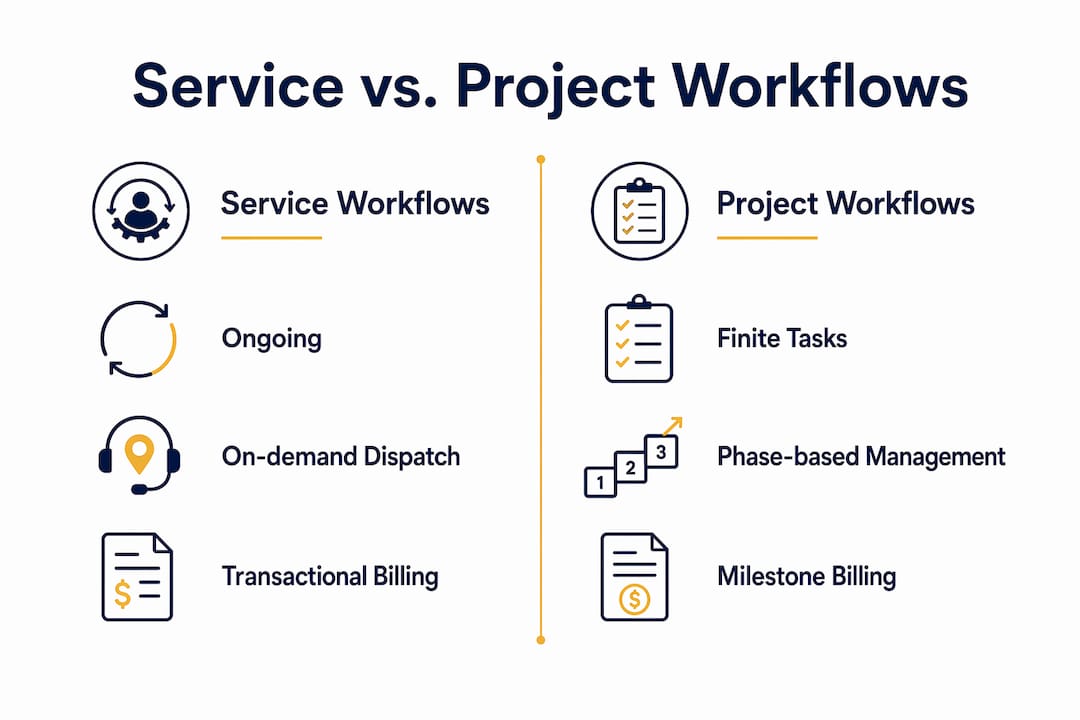
The core difference is duration and intent. A service workflow has no fixed end date. It repeats, adapts, and accumulates history over time. A project workflow starts, executes, and closes. Both are legitimate operating modes, but they require different tools, different billing structures, and different team behaviors.
Project management is broader in scope and coordination, while field execution workflows focus on detailed constructability and quality control. That distinction maps directly onto roofing operations. A re-roofing job on a 200,000-square-foot distribution center is a project. The quarterly inspection and repair contract on that same building is a service workflow. Treating them the same way creates confusion, missed billing, and operational drag.
The fragmentation tax is real. Forcing project rigor onto service calls and vice versa creates bottlenecks and cost overruns. Successful contractors treat these as distinct operating modes from the start.
What Are Service Workflows and How Do They Function in Roofing?
A service workflow is defined by its repeating nature. There is no project closeout, no final punch list, and no single invoice that ends the relationship. Instead, service workflows generate recurring touchpoints: scheduled inspections, emergency call-outs, preventive maintenance visits, and warranty checks.
In roofing, service workflow examples include:
- Preventive maintenance contracts with quarterly or semi-annual site visits
- Emergency leak response dispatched within hours of a client call
- Warranty inspection programs tied to manufacturer requirements
- Retainer-based roof asset management for property management firms
- Annual condition reports with photographic documentation
The billing model reflects the ongoing nature of the work. Monthly retainers, per-visit call-out fees, and annual maintenance agreements are all standard. This is fundamentally different from a lump-sum project invoice. Service billing requires speed. A technician who completes a leak repair at 2:00 PM should trigger an invoice before end of day, not three weeks later when someone in the office gets around to it.
Scheduling in service workflows prioritizes rapid dispatch. The moment a client calls, the system needs to surface technician availability, proximity, and asset history for that building. Automating crew dispatch for commercial roofing teams removes the manual back-and-forth that slows response time and frustrates clients.
Operational memory is the hidden asset in service workflows. Every visit, every repair, every photo taken on site builds a history that makes the next visit faster and more accurate. Without that history captured in a single system, technicians arrive blind and clients repeat themselves.
Pro Tip: Set up your service workflow so that every completed visit automatically logs photos, labor hours, and materials used against the building’s asset record. That data becomes your estimating baseline when the client eventually needs a full project.
What Are Project Workflows and Their Role in Roofing Projects?
A project workflow is defined by its boundaries. It has a scope, a budget, a start date, and a completion date. Every task inside it exists to move the project toward closeout. This is the project workflow explained in its simplest form: a finite sequence of coordinated activities with a clear deliverable at the end.
In commercial roofing, a project workflow typically moves through these phases:
- Estimating and proposal — scope definition, material takeoffs, labor costing
- Contract execution — signed agreement, mobilization plan, permit applications
- Procurement — material orders, subcontractor coordination, delivery scheduling
- Field execution — crew deployment, daily progress tracking, quality inspections
- Change order management — scope adjustments, client approvals, cost updates
- Closeout — punch list, warranty documentation, final invoice, lien waivers
Each phase generates documents. RFIs, submittals, change orders, daily logs, and safety records all belong to the project record. Project managers coordinate diverse stakeholders and soft costs across the full lifecycle, while field execution focuses on constructability and quality in the later phases.
Billing in project workflows follows the work. Fixed-price contracts, schedule-of-values draws, and milestone-based payments are all common. The key is that each billing event ties to a defined deliverable or percentage of completion. Construction cost tracking best practices require matching every cost to a budget line in real time, not at month-end reconciliation.
Large construction projects run over budget 90% of the time, and 98% finish late. Generic tools that lack field-specific integration are a major contributor. A project workflow needs tools built for construction, not adapted from generic task management software.
Key Differences Between Service and Project Workflows
The practical differences between these two workflow types show up in four areas: scope, timing, billing, and data management.
Scope and duration are the most obvious. Service workflows are open-ended. Project workflows close. A roofing contractor running both types simultaneously needs clear internal rules about which mode applies to each job. Mixing them creates the fragmentation tax: project-level documentation requirements slow down a two-hour leak repair, while service-level billing practices undercharge a six-week re-roofing job.
Scheduling and resource allocation work differently in each mode. Service workflows require on-demand dispatch, often within hours. Project workflows require forward planning across weeks or months, with crew assignments locked to specific phases. Automated workflows reduce invoicing delays by 3–5 days and cut time spent on estimates by 40–60% compared to manual processes. That efficiency gain matters more in service workflows, where billing speed directly affects cash flow.
Billing and invoicing reflect the underlying difference in scope. Service billing is transactional and frequent. Project billing is milestone-driven and tied to documentation. Mixing these up means either chasing small invoices with heavy paperwork or issuing large project draws without the supporting records clients expect.
Data and document management diverge sharply. Project workflows generate a formal record: contracts, submittals, RFIs, change orders, and closeout packages. Service workflows generate operational history: visit logs, photos, repair records, and asset condition notes. Both are valuable. Neither replaces the other.
Pro Tip: When a service technician identifies a condition that warrants a full project, that finding should automatically escalate into your estimating workflow. If your service and project systems don’t talk to each other, that upsell opportunity disappears into a handwritten note.
The most common pitfall is applying project-level approval chains to service calls. Requiring a change order for a $400 flashing repair adds days of delay and frustrates the client. Service workflows need fast, field-level authorization. Project workflows need formal documentation. The difference between workflows is not just operational. It is cultural.
How Integrating Service and Project Workflows Improves Roofing Efficiency
The biggest efficiency gain in roofing operations comes not from improving service workflows or project workflows in isolation. It comes from connecting them. A single source of truth across service and project teams prevents client repetition, reduces errors, and accelerates accurate estimating.
The handover moment is where most roofing companies lose money. A project closes, the crew moves on, and six months later a service technician shows up with no knowledge of what was installed, what the warranty covers, or what issues were flagged at closeout. The client has to explain everything again. That experience erodes trust and makes your team look disorganized.
Unified workflow systems solve this by carrying project history forward into the service record. Service teams with access to full project history avoid repeated client explanations and maintain accurate operational memory. That history also improves estimating when a service finding escalates into a new project scope.
The benefits of connecting both workflow types include:
- Faster invoicing across both modes, with automated triggers tied to job completion
- Accurate cost tracking that carries budget data from project execution into service history
- Upsell capture when service technicians identify project-scale needs in the field
- Reduced onboarding time for new technicians who can review full building history before arrival
- Stronger client relationships built on continuity and institutional knowledge
ERP systems and project platforms serve complementary roles. Project platforms drive execution responsiveness. ERP provides financial governance. Treating them as competitors causes failure. The same logic applies to service and project workflows: they are not competing approaches. They are complementary operating modes that need to share data.
Roofing companies that build the right integration stack early avoid the costly rework of migrating disconnected systems later. The goal is one operational record that spans the full client relationship, from first project to ongoing service contract.
Pro Tip: Track CRM lead sources alongside your workflow data. Roofing lead conversion rates improve when your sales team can see which service clients are ready for a project conversation based on asset condition history.
Terial Connects Service and Project Workflows for Roofing Contractors
Disconnected tools are the primary reason roofing contractors lose money at the handover between project completion and ongoing service. Terial is built to eliminate that gap. As the unified operating system for commercial roofing contractors, Terial connects estimating, field service, project scheduling, and automated invoicing into one real-time system. Field crews use it on site. Office teams see the same data instantly. When a project closes, the service record opens automatically. No data loss, no repeated client conversations, no billing delays. Explore Terial’s field service application to see how both workflow types run in one place.
Key Takeaways
Service and project workflows require distinct operating modes, billing structures, and data systems. Connecting them in a single platform is the most direct path to eliminating the fragmentation tax in commercial roofing operations.
FAQ
What Is the Main Difference Between Service and Project Workflows?
Service workflows are ongoing, repeating processes with no fixed end date, while project workflows are finite task sequences with a defined scope, budget, and closeout. The difference between workflows determines billing structure, scheduling approach, and documentation requirements.
How Do Roofing Contractors Manage Both Workflow Types at Once?
Successful contractors treat service and project workflows as distinct operating modes with separate scheduling, billing, and documentation rules, connected through a unified platform that shares client and asset history across both.
Why Do Large Roofing Projects Run Over Budget So Often?
90% of large construction projects run over budget because generic tools lack field-specific integration for real-time cost tracking. Project workflows require tools built for construction-phase execution, not adapted from generic task management software.
What Happens When Service and Project Workflows Are Not Connected?
Data leakage during handover causes service teams to arrive without project history, forcing clients to repeat themselves and reducing estimating accuracy for future project scopes.
How Does Automation Improve Workflow Management in Roofing?
Automated unified workflows reduce invoicing delays by 3–5 days and cut estimate time by 40–60% compared to manual processes, directly improving cash flow and reducing administrative overhead across both service and project operations.
Recommended
- Automated Workflows and Roofing Profitability: 2026 Guide
- Roofing Project Milestone Workflow: A Contractor’s Guide
- Commercial Roofing Crew Scheduling Workflow Guide
- Terial | Workflow Automation for Commercial Roofers




Book a personalized demo
Get a 30-minute demo tailored to how you run your commercial roofing business

“Making the switch to Terial has greatly exceeded my expectations and has already had a meaningful impact on our team’s productivity. Terial has significantly reduced the amount of time required to complete many of our day-to-day operational tasks, allowing our team to focus more on serving our customers.”

