
Automated Reporting for Roofing Operations Leaders
Discover the essential role of automated reporting for roofing operations leaders to boost efficiency and cut installation times dramatically.

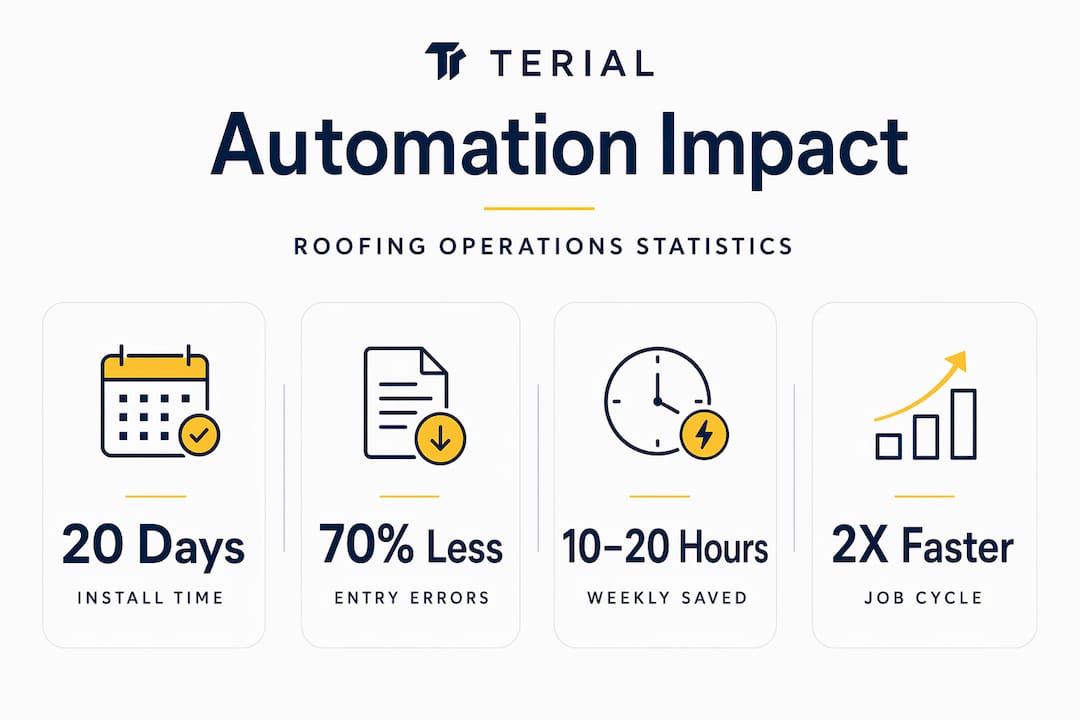
Automated reporting cut average days-to-install from 41 to under 20 days in documented roofing operations. That single data point should stop you cold. The role of automated reporting for roofing operations leaders is not about generating prettier PDFs or cleaner spreadsheets. It is about whether your decisions are running on real numbers or on memory and gut feelings. If you are still stitching together job data from three different tools every Monday morning, you are not behind on technology. You are behind on profit.
Key Takeaways
- Speed drives revenue: Automated reporting can cut installation timelines in half and save up to $20,000 in admin costs per job.
- Role-specific dashboards matter: Finance leaders and field managers need different KPIs; generic reports drive zero adoption and zero decisions.
- Start narrow, then scale: Prove value in one high-impact area before expanding automation tools across your operation.
- Culture beats software: Leadership buy-in and clear expectations determine whether automation succeeds or gets ignored by crews.
- Integration beats addition: Connecting CRM, dispatch, and reporting through a unified layer eliminates manual errors and fragile workarounds.
The Role of Automated Reporting in Roofing Workflow Efficiency
The numbers here are too significant to treat as abstract. Operations that implemented automated reporting saved 10 to 20 hours of manual work per week and reduced manual entry errors by 60 to 70 percent. That is not a marginal efficiency gain. That is a full-time employee’s workload handed back to your operation every single week.
Most of that waste comes from the same place: disconnected tools that do not talk to each other. Your estimating software does not know what your dispatch calendar says. Your invoicing system does not reflect what actually happened in the field. So someone on your team manually reconciles all of it, usually in a spreadsheet, usually the night before a meeting. Here are manual processes and the equivalent automated reporting alternative:
- Weekly spreadsheet reconciliation → Real-time project dashboards
- Phone calls to check crew status → Automated dispatch alerts
- End-of-month invoice audits → Auto-generated invoices from approved job data
- Separate cost tracking per job → Live budget vs. actual cost monitoring
When you sync CRM and dispatch software into a unified reporting layer, the gains compound. Syncing CRM and dispatch delivers a 34 percent improvement in task dispatching and reduces crew no-shows by 35 percent. That is before you account for the downstream benefit of having accurate job data feeding your next estimate.
The real-time dispatching connection between scheduling and field reporting is where most commercial roofing operations leave the most money on the table. Crews show up to jobs with outdated scopes. Office staff rework invoices because the field notes did not match the estimate. Automated reporting breaks that cycle by making the field and the office speak the same language, in real time.
Pro Tip: Before buying any new reporting tool, map one complete job cycle from estimate to invoice. Every manual handoff you find is a direct candidate for automation.
How Automation Sharpens Leadership Decision-Making
Here is the mistake most roofing leaders make when they first adopt reporting tools: they build one dashboard and show it to everyone. The VP of operations sees the same screen as the field supervisor. Neither finds it useful. Both stop using it within 60 days.
Dashboard design must map directly to each stakeholder’s decision needs to avoid vanity metrics and drive real usage. Finance needs margin analysis by job type and region. Field managers need real-time crew productivity broken down by job type. An executive needs profitability trends across the portfolio. These are not the same screen.
The leaders in roofing management who get the most from automated reporting define decision points first, then build the report around them. Ask the right questions:
- What decision does this person make in the next 48 hours?
- What data do they currently lack to make that decision confidently?
- What format do they actually check during a workday: mobile, desktop, weekly email digest?
When you answer those questions before configuring your reporting tool, your adoption rates climb and your decisions improve.
The goal of a roofing intelligence dashboard is not to display data. It is to eliminate the moment when a leader says, ‘I’ll have to get back to you on that.’
Forecasting also changes fundamentally when your data is live. Most commercial roofing operations forecast labor and materials based on the last completed similar job. That is backward-looking by definition. With automated reporting pulling real-time cost data from active jobs, you catch a budget overrun on week two instead of week eight. At that point, you still have options. At week eight, you are just documenting the loss.
Manual processes limit roofing scalability not because your team cannot work harder. They limit scale because manual data cannot move fast enough to support smart decisions across multiple jobs and crews simultaneously.
Implementation Pitfalls and Best Practices
Knowing that automated reporting delivers results is the easy part. Getting your team to actually use it is where most implementations fail. Successful adoption depends more on leadership and culture than on the technology itself. That truth is uncomfortable because it means the success or failure of your reporting system lands squarely on you, not on your software vendor.
Here is a phased approach that works in commercial roofing operations:
- Identify one high-impact problem. Pick the single biggest source of manual reporting pain, whether that is job costing, invoice reconciliation, or crew scheduling. Start there and only there.
- Involve your team early. Before you configure anything, sit down with the people who will use the tool daily. Their buy-in matters more than the feature list. They will find the workarounds if they feel excluded from the decision.
- Set clear usage expectations. Ambiguous adoption goals produce ambiguous results. Define which reports get checked, by whom, and on what cadence. Write it down and communicate it.
- Measure ROI within 90 days. Track metrics like cost-per-lead and booked-job-rate before expanding the system. If you cannot show a specific gain in 90 days, you have the wrong tool or the wrong configuration.
- Scale deliberately. Once the first area is working and the data confirms value, add the next workflow. Avoid the temptation to automate everything at once. Tool overload is real, and it kills adoption faster than any technical failure.
The technical side has its own trap. Most roofing software stacks grow by addition: a new dispatching tool here, a new estimating platform there, a reporting layer bolted on top. The result is a mess of point-to-point integrations that break every time one vendor pushes an update. Using a unified API layer rather than fragile middleware is how enterprise-grade roofing operations keep their data clean as they scale.
Pro Tip: When evaluating any reporting tool, ask the vendor directly: “How does your system handle a dispatch update that changes job cost mid-project?” If they cannot answer in plain language, the integration is probably fragile.
Future Trends Shaping Roofing Operations Reporting
The technology curve in commercial roofing is moving faster than most operations leaders realize. AI adoption among commercial roofing contractors grew from 17 percent in 2025 to 38 percent by Q1 2026, with the primary use cases in cost estimation and bid management. That adoption rate will only accelerate as the tools get cheaper and the competitive gap between adopters and non-adopters widens.
A few trends are worth watching closely:
- AI-powered drone inspection reporting is collapsing the time between site assessment and estimate generation. AI-enabled drone software can double or triple claims processing speed, closing large projects in 72 hours compared to the traditional three-week cycle.
- Unified platforms replacing siloed tools is no longer a vision for the future. The shift from growth to profitability, driven heavily by private equity interest in roofing consolidation, is forcing operations leaders to prioritize measurable margins over raw revenue. That requires centralized reporting across locations, not a patchwork of disconnected tools.
- Intelligent abstraction layers are replacing manual middleware. Rather than connecting tools one-by-one, leading operations are deploying unified API layers that allow CRM, dispatch, estimating, and reporting to share data without custom code that breaks under pressure.
The roofing operations analytics story is no longer just about efficiency. It is about creating the kind of operational transparency that makes your company attractive to partners, acquirers, and your own leadership team. Centralized, integrated reporting platforms do not just improve today’s decisions. They build the infrastructure your company needs to scale with confidence.
How Terial Puts This Into Practice for Commercial Roofers
Terial was built specifically because fragmentation is the real competitor in commercial roofing, not any individual software tool. When your estimating, dispatch, field service, and invoicing systems do not share data, your reporting will always be a reconstruction of the past rather than a view of the present.
Terial connects every operational workflow into a single, real-time system. Field crews log labor and materials from the job site. That data flows directly into cost monitoring, dispatch updates, and client-facing reports without anyone manually transferring it. James King Roofing grew service by 171% after bringing their operations onto a unified platform, with faster invoicing and real-time crew visibility driving the improvement.
If you want to see how roofing project data automation works when it is built for commercial operations from the ground up, explore Terial’s platform and see the full feature set built specifically for your workflows at Terial features.
FAQ
What is the role of automated reporting for roofing operations leaders?
Automated reporting gives roofing operations leaders real-time visibility into job costs, crew productivity, and project timelines. It replaces manual data reconciliation with live dashboards that support faster, more accurate decisions.
How much time can automated reporting save in a roofing operation?
Documented results show savings of 10 to 20 hours per week in manual work, with manual entry errors reduced by 60 to 70 percent when reporting tools are properly integrated with dispatch and CRM systems.
Why do roofing operations leaders need unified reporting instead of separate tools?
Separate tools create data gaps that require manual reconciliation, which introduces errors and delays decisions. A unified reporting layer connects CRM, dispatch, and field data so leaders always work from accurate, current information.
How should roofing leaders start implementing automated reporting?
Start with one high-impact area, prove measurable ROI within 90 days, then expand. Phased implementation reduces team resistance and prevents the tool overload that kills adoption in broader rollouts.
What KPIs matter most in roofing operations analytics dashboards?
Finance leaders should track margin by job type and region. Field managers need real-time crew productivity by job. Executives need portfolio-level profitability trends. Role-specific dashboards drive adoption because each user sees data tied directly to their decisions.
Recommended
- Terial | Workflow Automation for Commercial Roofers
- How Manual Processes Limit Roofing Scalability
- The Role of Real-Time Dispatching in Low-Slope Roofing
- The Integration Stack a $5M+ Commercial Roofer Should Build First


More articles



Book a personalized demo
Get a 30-minute demo tailored to how you run your commercial roofing business

“Making the switch to Terial has greatly exceeded my expectations and has already had a meaningful impact on our team’s productivity. Terial has significantly reduced the amount of time required to complete many of our day-to-day operational tasks, allowing our team to focus more on serving our customers.”

