
Mobile Work Order Completion for Roofing Contractors
Explore how mobile work order completion in roofing boosts efficiency. Streamline operations and enhance collaboration with this essential tool!

Mobile work order completion in roofing is the process of using mobile technology to create, update, and close work orders from the job site in real time. For commercial roofing contractors, this practice replaces paper forms, phone calls, and disconnected spreadsheets with a single digital workflow that keeps field crews and office teams synchronized. The industry term for this broader practice is field service management, and mobile work order completion is its most operationally critical function. Contractors who adopt it report faster billing cycles, fewer documentation disputes, and measurable reductions in administrative overhead. Workflow automation built on top of mobile work orders is where the real efficiency gains compound.
What Tools Are Essential for Mobile Work Order Completion in Roofing?
Effective mobile work order completion in roofing starts with the right foundation. Without it, contractors end up with a digital version of the same fragmented process they had on paper.
Hardware and Connectivity Requirements
Field crews need smartphones or tablets running iOS or Android with reliable mobile data access. On large commercial roofs, cellular dead zones are common, so any field service roofing app you deploy must support offline data entry with automatic sync when connectivity returns. Without offline capability, crews either skip documentation or revert to paper, which defeats the purpose entirely.
Software Capabilities That Matter
Not every app built for field service handles commercial roofing complexity well. Commercial jobs involve multi-day schedules, complex material orders, and safety documentation requirements that generic residential tools were never designed to manage. The table below outlines the core capabilities any platform must include before you commit to it.
Integration and Workflow Mapping
Before you deploy any mobile roofing management tool, map your existing workflow from job creation to invoice. Identify every handoff point where data currently moves by phone, text, or email. Those handoffs are your automation targets. Connecting your mobile app to your scheduling, estimating, and billing systems is what turns a documentation tool into a true operational upgrade.
Pro Tip: Run a two-week pilot with one crew before full deployment. Track how many manual handoffs they eliminate and use that data to build the business case for company-wide rollout.
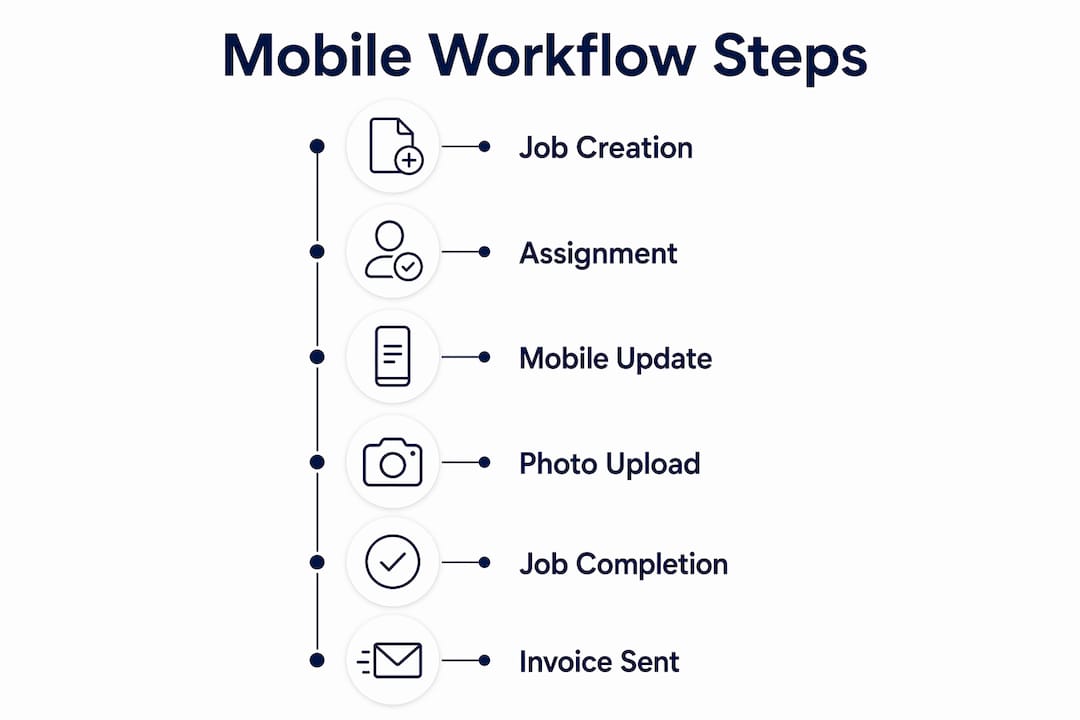
How Do You Complete Roofing Work Orders Using a Mobile App?
The step-by-step process for on-site roofing job completion via mobile is straightforward once your tools are configured correctly. Execution discipline from the crew is what separates contractors who see results from those who revert to old habits.
- Create and dispatch the work order. The office team creates the work order in the platform, assigns it to the crew, and dispatches it with all job details attached. Crew members receive an instant notification on their mobile device with scope, materials, safety requirements, and site access notes.
- Access job details on site. When the crew arrives, the lead technician opens the work order on their device and reviews the full job scope. All drawings, prior inspection notes, and customer instructions are attached to the record, not buried in an email thread.
- Capture photo and video documentation. Photo documentation apps for roofers provide time and location stamped images organized by project, which directly supports insurance claims, warranty callbacks, and dispute resolution. Crews should photograph the roof condition before work begins, during each phase, and after completion.
- Update job status and add field notes. As work progresses, technicians update the job status and log any field observations, material changes, or safety incidents directly in the app. These updates are visible to the office in real time, eliminating the end-of-day phone debrief.
- Collect electronic signatures and approvals. When the job is complete, the crew collects the customer’s digital signature on the work order through the app. This creates a timestamped approval record that is linked to the job file automatically.
- Trigger automatic downstream workflows. Once the work order is marked complete, automation triggers initiate the next steps: scheduling the follow-up inspection, generating the invoice, and sending the customer a completion notification. No one in the office has to manually start those processes.
Pro Tip: Require crews to upload a minimum of five photos per job phase before they can mark a status as complete. Build this as a required field in your app, not a verbal policy. Required fields get followed; verbal policies do not.
How Does Roofing Workflow Automation Connect to Mobile Work Orders?
Roofing workflow automation is the connective tissue between your mobile field updates and every other business system you run. When a crew marks a job complete on their phone, that single action should set off a chain of automated steps that would otherwise require three or four people making manual updates.
Workflow automation in roofing connects and automates repetitive tasks from lead generation to project completion, reducing manual work by automating data handoffs between systems. The practical implication is that your billing team does not need to wait for a call from the field to know a job is done.
The highest-ROI areas where automation compounds the value of mobile work order completion include:
- Automatic invoice generation. When a work order closes, the system pulls labor hours, materials used, and any change orders into a draft invoice without manual data entry.
- Scheduling triggers. Job completion automatically opens the next available scheduling slot for warranty inspections or follow-on work.
- Material reorder alerts. Inventory levels update when materials are logged against a job, triggering purchase orders before stock runs out.
- Customer notifications. Completion confirmations and satisfaction requests go out automatically, without anyone in the office drafting an email.
Contractors often believe they need CRM overhauls, but true efficiency gains come from integrating existing tools with automation that triggers workflow steps when crews mark jobs complete. This ‘connective tissue’ automation reduces manual data entry and speeds the billing cycle.
Implementing automated mobile workflows in roofing operations allows businesses to reclaim 10–20 hours of administrative time per week within the first month of deployment. That time comes directly from eliminating manual status updates, re-keying field data, and chasing crews for documentation.
Common Mistakes in Mobile Work Order Completion and How to Avoid Them
Most mobile work order rollouts fail not because of the technology but because of how contractors implement it. The mistakes below are predictable, and each one has a direct fix.
- Poor photo documentation practices. Crews who take unstructured photos and store them in personal camera rolls create a documentation gap that shows up during warranty disputes or insurance claims. Linking photo documentation directly to the job record with timestamps and geo-data resolves future warranty callbacks or payment issues without sifting through messages or phone photos.
- Skipping backend integration. A mobile app that does not connect to your scheduling and billing systems is just a digital notepad. The value comes from the data flowing automatically to the next step in your workflow, not from the app itself.
- Inadequate crew training. Deploying an app without structured onboarding produces low adoption rates. Crews who do not understand why the app matters to their own workflow will find workarounds. Training must explain the direct benefit to the crew, not just the office.
- Using residential tools for commercial jobs. Commercial roofing requires specialized handling for multi-day schedules, complex material orders, and safety documentation that generic residential-focused software often fails to manage. Stretching a residential tool to fit a commercial job creates gaps in compliance documentation and billing accuracy.
- No data consistency checks. Without required fields and completion checklists built into the app, crews submit incomplete work orders that require back-and-forth to correct. Build mandatory fields for photos, safety sign-offs, and material logs before any work order can be closed.
Pro Tip: Review poor work order management examples from your own job history before configuring your app. Your past errors are the best guide to which required fields and checkpoints you actually need.
How Do You Measure Success in Mobile Roofing Workflows?
Measuring the performance of your mobile work order process is how you move from “we think this is working” to “we know exactly where to improve.” Track these metrics from day one.
Key Metrics to Monitor
Work order processing time measures how long it takes from job completion to invoice sent. Task completion rate tracks the percentage of work orders closed with all required fields filled. Exception rate counts how often a work order is returned for missing information. Safety documentation completion rate shows whether crews are filing required compliance records on every job.
Manual vs. Automated Workflow Outcomes
The table below compares typical outcomes for commercial roofing crew operations running manual processes versus those using automated mobile workflows.
Once you have two or three months of data, use it to refine your required fields, adjust crew training, and identify which job types generate the most exceptions. That feedback loop is what turns a good mobile workflow into a great one.
Key Takeaways
Mobile work order completion in roofing delivers the most value when mobile field updates connect directly to automated billing, scheduling, and documentation workflows, eliminating the manual handoffs that slow commercial operations.
Terial Brings Your Mobile Work Orders and Workflows Together
Fragmented tools are the real productivity problem for commercial roofing contractors. When your field app does not talk to your scheduling system, and your scheduling system does not talk to your billing platform, every job completion creates manual work instead of eliminating it. Terial is built specifically to solve that fragmentation. Its field service application gives crews a mobile interface for capturing photos, logging labor, collecting signatures, and closing work orders, while the platform automatically triggers invoicing, scheduling, and customer notifications the moment a job is marked complete. Terial generates invoices in under a minute and keeps real-time cost data visible to both field and office teams. See how Terial’s workflow automation works for commercial roofers.
FAQ
What Is Mobile Work Order Completion in Roofing?
Mobile work order completion in roofing is the process of using a smartphone or tablet to create, update, document, and close work orders directly from the job site. It replaces paper forms and manual office entry with real-time digital records linked to each project.
How Does Roofing Workflow Automation Save Administrative Time?
Automated mobile workflows in roofing can reclaim 10–20 hours of administrative time per week by eliminating manual status updates, re-keying field data, and chasing crews for documentation after jobs close.
Why Do Commercial Roofers Need Specialized Mobile Apps?
Commercial roofing involves multi-day schedules, complex material orders, and safety compliance requirements that residential-focused apps are not built to handle. Using the wrong tool creates documentation gaps and billing errors on commercial jobs.
What Photos Should Crews Capture During a Roofing Work Order?
Crews should photograph the roof condition before work begins, at each phase of the job, and after completion. Photos must be geo-tagged and timestamped and linked directly to the job record to support insurance claims and warranty callbacks.
When Should Invoice Generation Be Triggered in a Mobile Workflow?
Invoice generation should trigger automatically the moment a crew marks a work order complete in the mobile app. Automation that connects job completion to billing eliminates the 2–5 day delay common in manual commercial roofing operations.
Recommended
- Terial | Workflow Automation for Commercial Roofers
- Commercial Roofing Crew Scheduling Workflow Guide
- Examples of Poor Work Order Management to Avoid
- Roofing Project Milestone Workflow: A Contractor’s Guide




Book a personalized demo
Get a 30-minute demo tailored to how you run your commercial roofing business

“Making the switch to Terial has greatly exceeded my expectations and has already had a meaningful impact on our team’s productivity. Terial has significantly reduced the amount of time required to complete many of our day-to-day operational tasks, allowing our team to focus more on serving our customers.”

